
TrustCall: Caller ID & Block
APE Technologies GroupCommunication
0.00.00 Reviews
- Version
- 1.0.0
- Installs
- 50.00K
- Age Rating
- Everyone
Screenshots
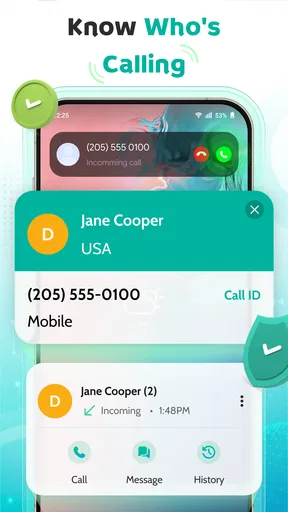
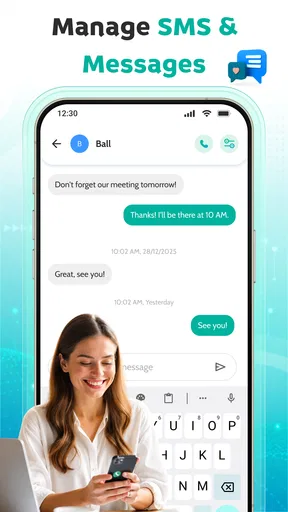
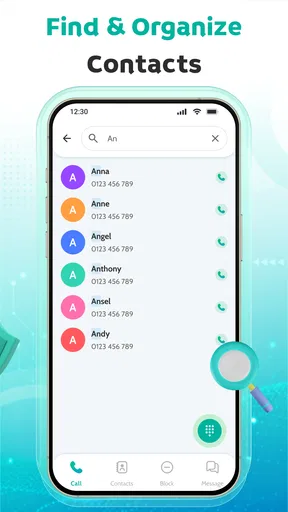
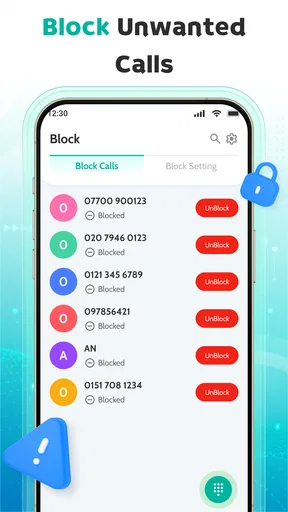
Our Review of TrustCall: Caller ID & Block
 Analysis by Appyee
Unwanted calls are rarely a dramatic problem at first. One unknown number appears during lunch, another interrupts work, and soon the phone feels less like a useful tool and more like an open door for anyone who happens to dial. TrustCall: Caller ID & Block takes a focused approach to that irritation: it is a free communication app built around controlling calls you would rather not receive. After using it, my impression is that its value comes from simplicity rather than from trying to become a complete phone replacement.
That narrow purpose matters. Many phones already include basic blocking, while larger caller-identification services often try to add broad databases, social discovery, messaging, or subscription features. TrustCall sits closer to the practical end of the category. It is made by APE Technologies Group, is available for Everyone, and runs on Android 8.0 or later. The current release is version 1.0.0, so I approached it as a straightforward tool for people who want a cleaner call experience without turning call management into a project.
One capability, used to put unwanted calls back under your control
The central capability is call blocking. That sounds basic, but the real benefit is not the act of rejecting one number; it is creating a calmer boundary around your phone. When a repeated nuisance caller is stopped before it reaches you, you do not have to decide whether to answer, wait for voicemail, silence the phone, or investigate the number again. The app removes that small interruption from your routine.
I think this is the right way to judge TrustCall. It should not be treated as a universal answer to every form of spam or as a replacement for careful phone habits. Its strength is more specific: it gives people a direct place to manage calls they already know they do not want. That is useful for persistent sales calls, repeated wrong numbers, and any contact that has become disruptive.
The distinction between blocking and merely ignoring is important. Ignoring still leaves a missed-call alert, a notification, or the temptation to call back. Blocking is a decision made once and applied to future attempts from that number. For someone who receives the same unwanted call several times, that change can feel larger than the feature list suggests.
There is also an emotional benefit. Unknown calls can create a moment of uncertainty, especially when they arrive during a meeting, while driving, or late in the evening. A dedicated blocker helps reduce the need to react to every ringing phone. The best result is not more information about every caller; it is fewer interruptions that demand your attention.
What the app changes in an ordinary day
Imagine receiving repeated calls from a number that never leaves a useful message. On the first attempt, you may check it. On the second, you may silence it. By the third or fourth attempt, the number has become a recurring nuisance. With TrustCall, the sensible workflow is to identify the unwanted number and block it rather than continuing the same cycle.
This is especially helpful for people who use their phone for work and personal life at the same time. A call that is merely annoying on a quiet afternoon can be genuinely costly when it breaks concentration during a customer conversation or makes you miss an important instruction. Blocking known troublemakers protects attention, not just the call screen.
I also see value for family members who are less comfortable exploring phone settings. The app’s focused purpose gives them a more approachable route than searching through several system menus. That does not mean every user will find it equally easy, but the concept is easier to explain: use the app when a number should stop reaching you.
How the blocking approach works in practice
The practical experience depends on treating the app as a small maintenance tool rather than something that needs constant attention. I would start by using it when an unwanted call is fresh in my mind. That avoids the common mistake of remembering only that a number was irritating without remembering which number it was. Once the number is selected for blocking, future calls from it can be handled as part of the rule you created.
That workflow is more reliable than trying to memorize numbers or keep a separate note. It also makes the decision reversible in principle: if you block someone by mistake, you can review your choices and correct them instead of leaving the error buried in your phone’s history. I would still check carefully before blocking a number, particularly when dealing with delivery drivers, schools, medical offices, or temporary work contacts.
A useful habit is to separate “unknown” from “unwanted.” Not every unfamiliar number is dangerous, and not every known number is welcome. If you are waiting for a call from a service provider, a clinic, or a new employer, aggressive blocking can work against you. TrustCall is most useful when you make deliberate choices instead of treating every number outside your contacts as a threat.
That is one of the less obvious trade-offs of a focused blocker: it depends on the quality of your decisions. The app can help enforce a boundary, but it cannot know the personal context behind every call unless the product specifically supplies that information. I would use it to stop clear repeat offenders, not as a reason to reject all unfamiliar callers automatically.
A practical routine for keeping the list useful
I would review blocked numbers occasionally, especially after a period of travel, a house move, a job change, or any situation where new legitimate contacts become common. A number that was irrelevant last month may be useful now. A short review also prevents the block list from becoming a forgotten collection of rushed decisions.
Another good practice is to block after observing a pattern rather than reacting to one accidental call. A single wrong number can be harmless, while several attempts with no clear purpose are more persuasive. This approach reduces false positives and keeps the app aligned with its real job: removing persistent disturbances without making communication harder.
For people who share a phone with work responsibilities, I would also create a personal rule about urgent callers. For example, a number that repeatedly calls but never leaves a message might be blocked, while a new number that calls once during expected business hours could be allowed through until its identity is clear. The app becomes more effective when it supports a consistent personal policy.
What it feels like compared with built-in phone controls
Most modern phones offer some form of number blocking, so the obvious question is why a separate app is worthwhile. In my view, TrustCall makes sense when you prefer a dedicated place for this task or find the phone’s built-in controls difficult to locate. The benefit is not necessarily a dramatic expansion of what blocking means. It is the convenience of having the purpose made explicit.
Built-in controls can be the better choice for someone who wants the fewest installed apps and is already comfortable managing calls from the system phone application. They are also tightly integrated with the device, which can make them feel more natural. TrustCall is a better fit when a separate, focused interface helps you act quickly and remember where your blocked-call decisions live.
Compared with broad caller-identification services, the appeal here is restraint. Large services can be useful when you want extensive information about unfamiliar callers, but they may feel excessive if your main goal is simply to stop a handful of persistent numbers. TrustCall’s focused identity makes it easier to understand what you are installing and what result to expect.
The situation where TrustCall makes the biggest difference
The strongest everyday scenario is a phone user who is being interrupted repeatedly by a small number of unwanted callers. Consider someone working from home who receives several sales calls during online meetings. They do not necessarily need an enormous caller database or a new messaging platform. They need those recurring numbers to stop competing with work.
In that situation, I would use the app as soon as the pattern becomes clear. After blocking the offending numbers, the person can return to their normal call habits without checking every ring. The improvement is modest but concrete: fewer interruptions, fewer moments spent deciding whether to answer, and less time searching for the same number later.
Another good scenario is an older relative who has started receiving repeated nuisance calls. The most useful setup would involve helping them identify which contacts are safe and which numbers should be blocked, then showing them how to revisit the decision. The app cannot replace a conversation about suspicious calls, but it can support that conversation with a practical action.
It can also help someone who has recently published a phone number publicly for a temporary reason, such as selling an item or arranging a service. Once the activity ends, unwanted calls may continue. Blocking the numbers that keep returning is more convenient than changing a personal number or living with constant interruptions.
Still, I would not rely on it as the sole defense against fraud. A blocked number can be replaced by another number, and a caller may use different identities. The app is strongest against repeat nuisances, not against every possible form of deception. Basic caution remains essential: I would avoid sharing sensitive information and would verify important callers through an independent channel.
The trade-offs that are easy to overlook
The first trade-off is coverage. A blocker aimed at numbers you identify may be excellent at handling known nuisances, but it is not automatically the same as a continuously updated service that labels a wide range of callers. If your main concern is discovering who is behind every unfamiliar number before answering, a more expansive caller-identification product may suit you better.
The second is the risk of overblocking. People often block in frustration, especially after several interruptions. That can create problems when legitimate callers use numbers you do not recognize. I would be cautious with numbers connected to healthcare, schools, delivery services, government offices, or short-term projects. Keeping a note of expected calls before blocking is a simple way to avoid an unnecessary mistake.
The third trade-off is that a focused app may feel redundant on a phone whose built-in blocker already meets your needs. If you rarely receive unwanted calls, adding a separate tool may not change your day enough to justify another app in your routine. TrustCall earns its place more clearly when call control is a repeated problem rather than an occasional annoyance.
Version 1.0.0 also shapes my expectations. I would use it for the core blocking job and judge it by whether that job feels clear and dependable, rather than expecting a mature ecosystem of extras. Early versions can be appealing because they stay focused, but users who want a long history of advanced call-screening tools may prefer a more established alternative.
There is a practical privacy question with any call-management app, even when the feature itself sounds simple. Before making it part of my everyday phone setup, I would read the app’s permission prompts and privacy explanations carefully and grant only what is necessary for the functions I intend to use. I would not assume that “blocking” tells me everything about how a product handles call-related information.
That caution is not a criticism unique to TrustCall; it is a sensible rule for this category. A call blocker sits close to personal communication, so convenience should be balanced with awareness. If you are uncomfortable installing a separate app for a task your phone already handles, the built-in option remains a reasonable alternative.
Who gains the most from this focused tool
TrustCall is a good match for people who want a simple answer to a specific problem: repeated unwanted calls. It is particularly suitable for users who prefer a dedicated communication utility over a broad service packed with unrelated functions. The fact that it is free makes trying that approach easier, and its Everyone rating keeps the intended audience broad.
It may also suit households where one person helps another manage phone interruptions. The important part is not handing over control permanently; it is establishing a straightforward routine. Identify a genuine nuisance, block it, and review the decision if circumstances change. That process is easy to explain and does not require the user to become an expert in phone settings.
People using older Android devices may appreciate that the app supports Android 8.0 and later. That gives it a wider practical reach than tools limited to newer operating-system releases. I would still check that the phone behaves well with the app before depending on it for important calls, particularly on an older device used for work or family care.
On the other hand, I would skip it if my needs centered on detailed caller intelligence, broad spam labeling, or a highly automated screening system. I would also skip it if the phone’s native blocking controls were already easy to use and sufficient. In those cases, a separate app may add another step without solving a new problem.
The app has attracted over ten thousand installs, which suggests that its straightforward purpose is finding an audience, but I would not choose it on reach alone. I would choose it because the workflow matches my needs: I want to stop known unwanted callers without turning call management into a larger commitment. The developer, APE Technologies Group, has kept the product identity clear enough that this decision is easy to make.
My final view is positive but deliberately measured. TrustCall: Caller ID & Block is most convincing as a focused call-blocking companion, not as an all-purpose communication suite. I like the way its core idea maps to a real daily frustration, and I would recommend it to a friend dealing with repeated nuisance numbers who wants a free, approachable solution.
I would recommend using it thoughtfully: block clear repeat offenders, protect important unknown contacts until you know who they are, and review your choices after your circumstances change. With that discipline, the app can make the phone feel noticeably less demanding. If you need extensive caller identification or your built-in controls already work well, another option may be better. For the person who mainly wants unwanted calls to stop taking over the day, TrustCall offers a practical boundary with very little conceptual clutter.
Verdict
Strengths of TrustCall: Caller ID & Block
- Identifies many unknown callers before you answer.
- Blocks reported spam and scam numbers automatically.
- Reverse number lookup helps investigate unfamiliar calls.
- Simple interface makes call screening quick to manage.
- Useful reporting tools help improve the spam database.
Limitations of TrustCall: Caller ID & Block
- Caller identification may be less accurate for private numbers.
- Some features may require a subscription or in-app purchase.
- The app may need access to call-related personal data.
- Spam protection can occasionally block legitimate callers.
- Performance and database coverage may vary by country.
Similar Picks in This Category
View All
Google Messages
Google LLC4.6

Gmail
Google LLC4.1

Google Meet
Google LLC4.4

Google Chrome
Google LLC4.1

WhatsApp Messenger
WhatsApp LLC4.6

Carrier Services
Google LLC4.2
Frequently Asked Questions
What is TrustCall: Caller ID & Block, and how does it work?
TrustCall: Caller ID & Block is designed to help identify incoming callers and reduce unwanted calls. It can display information about unknown numbers when available, flag suspected spam, and let you block callers directly from the app. Results may vary depending on the number, available databases, device permissions, and your mobile operator or region.
Does TrustCall: Caller ID & Block require access to my contacts and phone calls?
The app may request permissions related to phone calls, contacts, notifications, and call history so it can identify incoming numbers, manage blocked calls, and provide its main features. Before accepting, review each permission carefully and check the app’s privacy policy. Some functions may be limited if you deny access, while contact-related permissions may not be necessary for every feature.
Can TrustCall completely stop spam, scam, or telemarketing calls?
TrustCall can help detect and block many unwanted calls, but no caller-identification service can guarantee complete protection. New numbers, spoofed caller IDs, private callers, and numbers not yet reported may bypass detection. It is best used alongside your phone’s built-in blocking tools, cautious call-handling habits, and reporting suspicious activity to your carrier or the relevant authorities.
Is TrustCall: Caller ID & Block free to use?
Availability of features may depend on the version of TrustCall you install. The app may offer basic caller identification or blocking at no cost while reserving advanced tools, expanded lookup options, or an ad-free experience for a subscription or in-app purchase. Check the current Google Play or App Store listing for pricing, trial conditions, renewal terms, and regional differences before downloading.
Is my personal information safe when using TrustCall?
Because caller-identification apps may process phone numbers, call-related information, device data, or contacts depending on the permissions granted, privacy should be checked before installation. Read TrustCall’s current privacy policy and store disclosures to understand what is collected, why it is used, and whether it is shared. Avoid granting permissions that are unrelated to the features you intend to use.
